Drive the Unreal Editor from your AI
Unreal MCP Pro connects Claude Code, Cursor and other MCP clients to the Unreal Engine 5 editor. The AI places and arranges actors, builds Blueprint classes, material graphs, input actions and gameplay abilities, lights the scene with Lumen, runs Play In Editor and automation tests, and falls back to editor Python when it needs to. 197 tools in 39 categories.
Buy once, free updates. Plugin source is public on GitHub.- 1
new_levelempty level - 2
batch_spawn_actorsfloor and four walls as StaticMeshActors - 3
batch_set_propertyStaticMesh = /Engine/BasicShapes/Cube on all five - 4
batch_transformscale and place them - 5
add_light · set_light_propertypoint light, warm color, intensity - 6
add_sky_atmosphere · set_skylightsky and ambient light - 7
save_level · capture_viewportsave, screenshot to Saved/Screenshots
How it works
Two parts: a Node.js MCP server that your AI client starts, and a C++ editor plugin that runs each command with the Unreal Editor API.
AI client (Claude Code, Cursor, ...)
        |  MCP over stdio
        v
unreal-mcp-pro  (Node.js MCP server, 197 tools, --lite: 45)
        |  WebSocket, JSON-RPC 2.0, 127.0.0.1:6705-6709
        v
UnrealMCPPro  (C++ editor plugin; reconnects every 3 s)
        |  Unreal Editor API, undoable transactions
        v
Unreal Engine 5.7 editor
The server listens on a WebSocket at 127.0.0.1, taking the first free port from 6705 to 6709. The plugin connects to every port in that range and retries every 3 seconds, so start order does not matter and up to five AI clients can share one editor. Commands run in the open editor as undoable transactions: you watch the level change and can keep working by hand. Long jobs such as lighting builds and imports get a 2-minute timeout instead of 30 seconds.
What the AI can do in Unreal
Grouped by area. Tool names are the ones your AI client sees.
Actors and transforms
Spawn any actor class, find, rename, duplicate, tag, group, hide and select actors; set world and relative transforms, mobility, snap to ground.
spawn_actor find_actors duplicate_actor set_transform snap_to_groundBatch edits
Spawn many actors in one call, set one property on many actors, move and scale them together: a blockout is a handful of calls, not hundreds.
batch_spawn_actors batch_set_property batch_transformComponents
Add and remove components, list them, read and write any component property, for example a mesh, a material slot or collision settings.
add_component list_components get_component_properties set_component_propertyBlueprints
Create Blueprint classes from any parent, add components, variables and default values, compile, and inspect the result.
create_blueprint add_blueprint_component create_blueprint_variable compile_blueprintMaterials and material graphs
Create materials and instances, set scalar, vector and texture parameters, add and connect expression nodes, make material functions, assign to actors.
create_material create_material_instance add_material_expression connect_material_nodes assign_materialLighting and rendering
Point, spot, directional and rect lights; Lumen GI and reflections; skylight and sky atmosphere; post-process volumes; Nanite and Virtual Shadow Maps; show flags.
add_light set_lumen_settings set_skylight add_post_process_volume set_virtual_shadow_mapsEnhanced Input and UMG
Input actions, mapping contexts and key mappings; Widget Blueprints with child widgets and properties.
create_input_action create_input_mapping_context add_action_mapping create_widget_blueprint add_widget_childGAS, data and AI assets
Gameplay Ability and Effect Blueprints, gameplay tags, DataTables with rows, data assets and curves, Behavior Trees and Blackboard keys.
create_gameplay_ability add_gameplay_tag create_data_table add_data_table_row set_blackboard_keyAssets and meshes
Find, import, export, rename and delete assets; import static and skeletal meshes and animations; LODs, collision, Nanite, sockets, Anim Blueprints, blend spaces, montages.
find_assets import_static_mesh enable_nanite import_animation create_blend_spacePlay, debug and test
Start and stop Play In Editor, run console commands, read the output log, stats and scene statistics; list and run automation and functional tests.
play_in_editor stop_pie get_output_log get_scene_stats run_automation_testEditor Python
Run Python in the editor or a script file. The escape hatch for anything the dedicated tools do not cover yet.
execute_python run_python_script get_python_pathsProject, levels and safety
Project settings, plugins, levels and the outliner; undo, redo and undo history; source control status, checkout and revert; lighting builds and cooking.
get_world_outliner set_project_setting undo get_sc_status build_lightingOverview
Typographic illustrations, not editor screenshots.
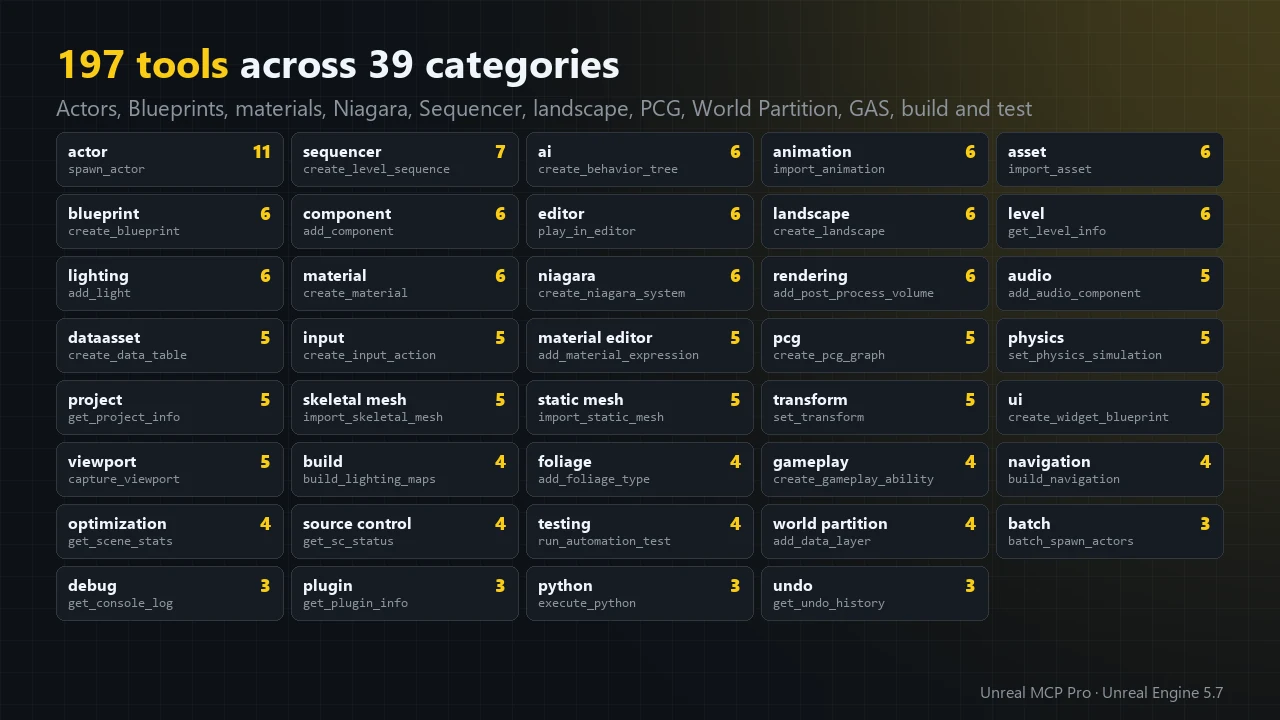
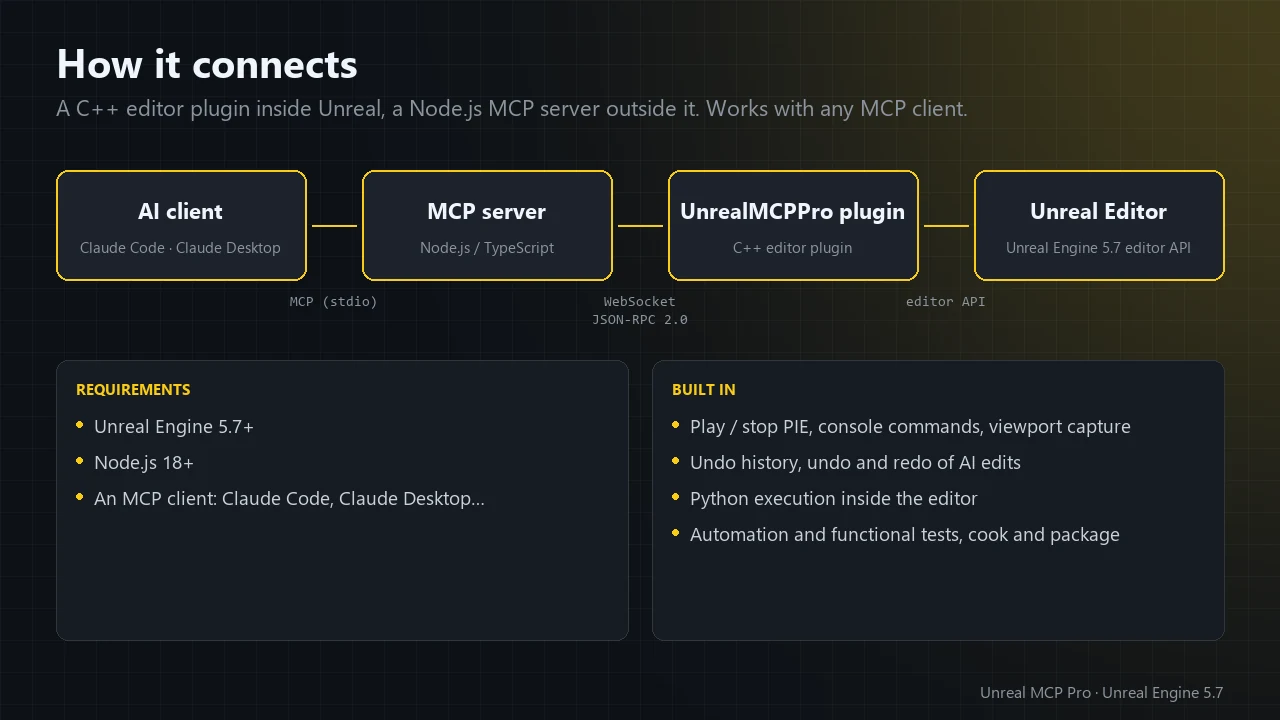
All 197 tools
Generated from the server source. lite marks the 45 tools that stay in lite mode. Tools marked † (25) do not act in 1.0.3: they return manual or editor-Python steps instead, or, for the three marked ‡, report success without making the change.
Show the full tool list
Actorslite11
spawn_actordelete_actorrename_actorfind_actorsget_actor_infoselect_actorduplicate_actormove_actorset_actor_tagset_actor_visibilitygroup_actorsBlueprintslite6
create_blueprintadd_blueprint_componentset_blueprint_defaultget_blueprint_infocompile_blueprintcreate_blueprint_variableComponentslite6
add_componentremove_componentget_component_propertiesset_component_propertylist_componentsget_component_classesEditorlite6
play_in_editorstop_pieget_play_stateexecute_console_commandget_output_logfocus_viewportLevelslite6
get_level_infoload_levelsave_levelnew_levelget_world_outlinerlist_levelsProjectlite5
get_project_infoget_project_settingsset_project_settinglist_pluginsget_engine_versionTransformslite5
set_transformget_transformset_relative_transformset_mobilitysnap_to_groundAI6
create_behavior_treecreate_blackboardadd_bt_node†set_blackboard_keycreate_eqs†get_ai_infoAnimation6
import_animationcreate_anim_blueprintset_anim_blueprintcreate_blend_spacecreate_anim_montageget_animation_infoAssets6
import_assetdelete_assetrename_assetfind_assetsget_asset_infoexport_assetAudio5
add_audio_componentcreate_sound_cueset_attenuationcreate_metasound†get_audio_infoBatch3
batch_spawn_actorsbatch_set_propertybatch_transformBuild4
build_lighting_mapscook_contentpackage_project†get_build_statusData assets5
create_data_tableadd_data_table_rowget_data_tablecreate_data_assetcreate_curveDebug3
get_console_logrun_console_commandget_statEnhanced Input5
create_input_actioncreate_input_mapping_contextadd_action_mappingset_input_trigger†get_input_infoFoliage4
add_foliage_type†paint_foliage†remove_foliage†get_foliage_infoGameplay / GAS4
create_gameplay_abilitycreate_gameplay_effectadd_gameplay_tagget_gameplay_infoLandscape6
create_landscape†sculpt_landscape†paint_landscape_layer†add_landscape_layer†import_heightmap†get_landscape_infoLighting6
add_lightset_light_propertybuild_lightingset_lumen_settingsset_skylightadd_sky_atmosphereMaterial graph5
add_material_expressionconnect_material_nodesset_expression_valueget_material_graphcreate_material_functionMaterials6
create_materialcreate_material_instanceset_material_parameterget_material_infoassign_materiallist_materialsNavigation4
build_navigationset_nav_mesh_settingsadd_nav_modifiertest_pathNiagara6
create_niagara_system†add_niagara_emitter†set_niagara_parameterget_niagara_infoactivate_niagaracreate_niagara_emitter†Optimization4
get_scene_statsget_texture_statsset_scalabilityprofile_scenePCG5
create_pcg_graphadd_pcg_node‡set_pcg_settings‡generate_pcgget_pcg_infoPhysics5
set_physics_simulationadd_physics_constraintset_collision_presetset_collision_responseget_physics_infoPlugins3
get_plugin_infoenable_plugindisable_pluginPython3
execute_pythonrun_python_scriptget_python_pathsRendering6
add_post_process_volumeset_post_process_settingsset_nanite_settingsset_lumen_gi_settingsset_virtual_shadow_mapsset_show_flagSequencer7
create_level_sequenceadd_sequence_track†add_sequence_keyframe†bind_actor_to_sequenceset_sequence_rangeplay_sequence†get_sequence_infoSkeletal meshes5
import_skeletal_meshget_skeleton_infoadd_socketset_physics_assetretarget_skeleton†Source control4
get_sc_statuscheckout_filerevert_fileget_changelistStatic meshes5
import_static_meshset_mesh_lodset_collisionenable_naniteget_mesh_infoTesting4
run_automation_testlist_automation_testsrun_functional_testget_test_resultsUMG widgets5
create_widget_blueprintadd_widget_childset_widget_propertyset_widget_binding†get_widget_infoUndo3
undoredoget_undo_historyViewport5
capture_viewportset_viewport_cameraset_view_modeget_viewport_infofocus_on_actorWorld Partition4
get_world_partition_infoadd_data_layerset_actor_data_layer†load_region‡Demo
Screen recordings of an AI working in the Unreal Editor.
Supported clients
Any MCP client that can start a local stdio server. Configs for the first three are in the setup guide.
Install outline
About 20 minutes, most of it the first plugin build. The setup guide walks through every step.
Copy the plugin into your project
Unzip the download to a permanent folder, for example C:\tools\unreal-mcp-pro, and copy plugin/UnrealMCPPro to YourProject/Plugins/UnrealMCPPro.
Build the plugin
C++ project: right-click the .uproject, Generate Visual Studio project files, build Development Editor. Blueprint-only project: open it and accept the offer to build the missing module (needs Visual Studio with the C++ toolchain).
Build the MCP server (Node.js 18+)
cd C:\tools\unreal-mcp-pro\server
npm install
npm run build
Register the server with your AI client
claude mcp add unreal -- node C:/tools/unreal-mcp-pro/server/build/index.jsCursor and Claude Desktop use the same command in their JSON config; see the setup guide.
Open the project and ask
The plugin connects within a few seconds. Try "Call get_project_info and get_level_info, then tell me what is in this level."
Requirements: Unreal Engine 5.7 or later, Visual Studio with the C++ game development workload, Node.js 18 or later. Developed and built on Windows; macOS and Linux untested.
What to expect in 1.0.3
- 172 of 197 tools act in the editor. 25 do not yet; the biggest gaps are landscape creation and sculpting, foliage painting, creating Niagara systems and emitters, Sequencer tracks, keys and playback, PCG node editing, Behavior Tree nodes and packaging. Most of those answer with the manual or editor-Python route.
- Blueprints: the AI creates classes, components, variables and defaults and compiles them, but does not edit event graphs.
- Material graphs: nodes can be added, set and connected to each other; wiring a node to the material's output pins goes through execute_python.
- spawn_actor ignores its template argument; put meshes on StaticMeshActors with set_component_property or batch_set_property.
- capture_viewport saves a file and returns its path; the image is not sent to the model.
- Editing commands refuse to run while Play In Editor is active (stop_pie first). Python tools need the Python Editor Script Plugin, GAS tools the GameplayAbilities plugin.
- Built against UE 5.7 on Windows. macOS, Linux and later engine versions are untested.
- All later updates are free for buyers.
FAQ
What is Unreal MCP Pro?
Does every tool change the editor?
Which Unreal Engine versions and platforms are supported?
Which AI clients work?
Do I need a C++ project?
Can the AI see the viewport?
Is it safe to run?
The plugin is on GitHub. What does the purchase include?
How much is it, and is there a subscription?
Guides
Step-by-step articles. All guides
- MCP server with 197 tools in 39 categories
- Lite mode with 45 core tools for clients with tool caps
- C++ editor plugin for Unreal Engine 5.7 (source)
- 7 MCP resources: project, outliner, output log, assets and more
- Up to five AI clients on one editor
- Free updates
More MCP Pro tools
The same idea for other apps: make assets in Blender, Painter and Designer, build games in Godot or Unity.